
Captions AI Review What Creators Should Know Before Using It

Creators today are producing more video content than ever before. Social platforms, short form videos, and online courses all demand clear, engaging media that resonates with audiences. One challenge many creators face is making that content accessible and easy to follow — especially when it comes to captions, subtitles, and localized text.
That is where captions ai comes in.
In this Captions AI review, we will explore what this tool is, how it works, and why video creators, marketers, educators, and social media managers should understand its capabilities before using it.
Video accessibility, engagement, and discoverability are critical in competitive digital landscapes such as the United States, United Kingdom, Canada, and Australia. Captions AI aims to automate the process of generating and editing captions, reducing workload while improving quality and accessibility.
If you are researching AI captioning solutions to streamline your content creation workflow, this guide will help you evaluate whether captions ai is a good fit for your needs.
What Is Captions AI
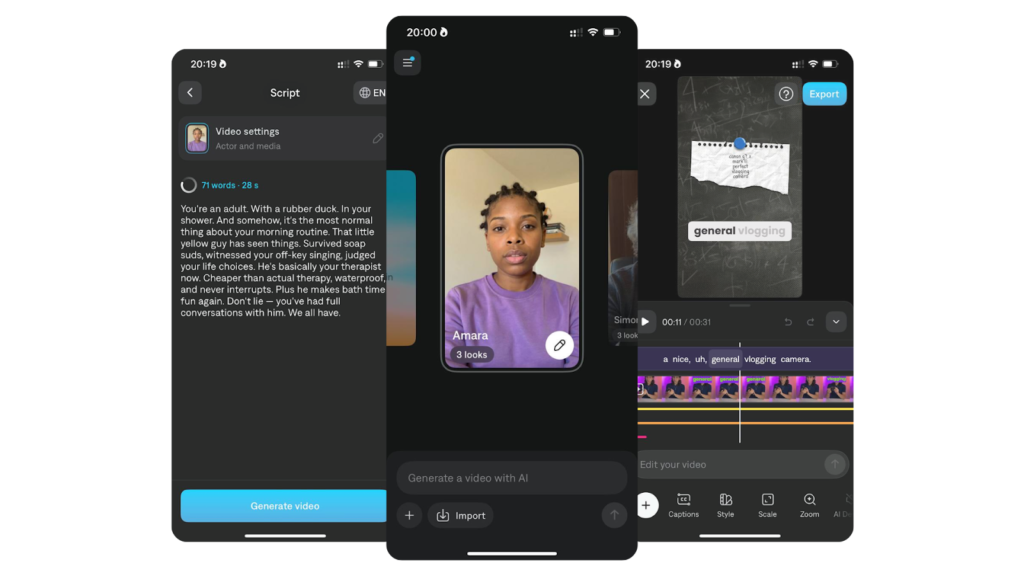
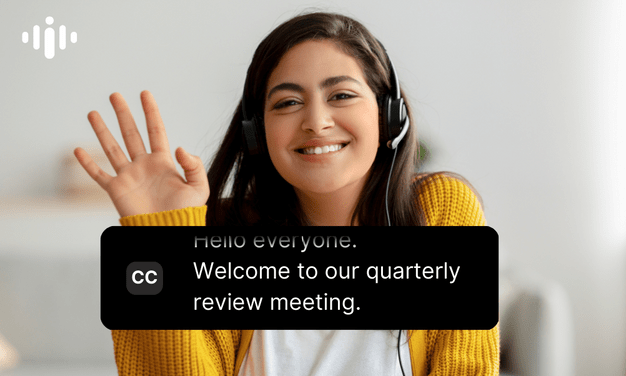
Captions AI is an artificial intelligence powered tool designed to automatically generate captions and subtitles for video content. Unlike traditional transcription services that require manual editing or time consuming uploads, captions ai uses advanced speech recognition and language models to quickly convert spoken dialogue into accurate on screen text.
The platform positions itself within the broader landscape of AI video tools and accessibility solutions. It is specifically tailored for creators who produce video content regularly and need a fast, reliable way to add captions for engagement, accessibility, and search optimization.
Captions AI is not simply a transcription service. It combines automated caption creation with editing tools, export options, and language support to make caption management a seamless part of the video production workflow.
How Captions AI Works
Understanding how captions ai works helps creators visualize how it fits into their production processes.
Uploading Your Video
Users start by uploading a video file or connecting a video source. Supported formats may include MP4, MOV, and others that are standard for online platforms.
Automatic Caption Generation
Once the video is uploaded, captions ai uses speech recognition to transcribe the audio track. The AI identifies spoken words, punctuation, and pauses to produce readable captions.
Editing And Refinement
After the initial transcription, users can review and edit captions directly within the platform. This includes adjusting timing, correcting text, and formatting styles.
Exporting Captions
Once finalized, creators can export captions in multiple formats such as SRT, VTT, or embedded subtitle tracks ready for uploading to video platforms.
The workflow is straightforward: upload, generate, edit, and export.
Core Features Overview
Automatic Speech Recognition
Captions AI uses advanced speech to text technology to generate captions from audio tracks.
Why It Matters
Accurate speech recognition removes the need for manual typing, saving time and reducing errors.
Multi Language Support
Some versions of the tool support caption generation in multiple languages.
Why It Matters
Creators who localize their content can reach broader global audiences with translated subtitles.
Timing And Formatting Controls
Users can adjust caption timing and text style to match their brand or platform requirements.
Why It Matters
Readable and well formatted captions improve viewer engagement and accessibility.
Easy Export Options
Export captions in widely supported formats for platforms like YouTube, Vimeo, TikTok, and professional editors.
Why It Matters
Flexible export options ensure creators can use captions across different publishing workflows.
These features help simplify the end to end caption creation process.
Key Benefits For Users
The value of captions ai comes from real world creator needs.
Saves Time On Post Production
Manual captioning is time intensive. Automating this process lets creators focus on strategy and content quality.
Improves Accessibility
Providing captions makes videos accessible to viewers who are deaf or hard of hearing, expanding audience reach.
Boosts Engagement
Captions help retain viewer attention, especially in silent autoplay environments common on social media.
Enhances Search Visibility
Search engines index caption text, making videos more discoverable in search results and recommendations.
For creators producing content regularly, these benefits translate into measurable productivity gains.
Who Should Use This Software
Captions AI is best suited for:
Video Creators
YouTubers, social media influencers, podcasters with video, and livestreamers who need professional captions quickly.
Content Marketers
Professionals producing social ads, educational videos, and campaign content where captions increase reach.
Educators And Trainers
Teachers and online instructors who publish lectures, tutorials, and course videos.
Agencies And Freelancers
Those producing video content for clients where efficiency and quality matter.
Creators with high production volumes will likely see the most benefit.
Use Cases And Real World Scenarios
A creator in the United States producing daily YouTube videos uploads footage to captions ai to generate captions in minutes instead of hours.
A social media manager in the United Kingdom exports caption files for Instagram Reels and TikTok content, improving viewer retention.
An online educator in Canada uses translated subtitles to expand their course reach to non native speakers.
A marketing agency in Australia integrates automated caption workflows into their client deliverables, centralizing quality and consistency.
These practical scenarios show how captions ai supports diverse workflows.
User Experience And Interface
Captions AI typically features an intuitive dashboard where creators can upload, edit, and export captions without steep learning curves.
Editors often include timing sliders, text style previews, and real time transcript feedback. Tools are usually labeled clearly, and common actions like uploading and exporting are straightforward.
For content creators, ease of use is essential. A clean interface supports fast adoption and reduces frustration.
Multiplatform accessibility, such as browser access, ensures creators can work from laptops or mobile devices.
Pricing And Plans Overview
Captions AI tools may offer tiered subscription plans based on usage. Entry level plans often include a set number of minutes per month for caption generation, while higher plans support larger libraries, multi language processing, and more export formats.
Free trials or limited free usage may be available for creators who want to test the tool before committing.
When evaluating pricing, creators should consider their monthly video output and required caption formats.
Pros And Cons
Pros
Saves time on captioning
Improves accessibility and engagement
Supports multiple export formats
Some tools offer multi language capabilities
Cons
Audio accuracy may vary depending on sound quality
Advanced editing options may be limited compared to professional editors
Subscription cost may not suit occasional creators
Balanced evaluation helps creators decide if the tool fits their workflow and budget.
Comparison With Similar Tools
Captions AI competes with a range of captioning and transcription solutions including:
- Descript
- Rev
- Otter
Compared with full featured editing suites like Descript, captions ai may be simpler but faster for straightforward caption needs.
Rev provides human edited captioning for high accuracy but at a higher cost.
Otter is focused more on meeting transcription and notes rather than caption export.
Captions AI may offer a middle ground with automated speed and creator focused features.
Buying Considerations For Decision Makers
Before adopting captions ai at scale, decision makers should assess:
Volume Of Content
Higher video output may justify a subscription with expanded minutes.
Accuracy Requirements
Ask whether automated transcription quality meets your needs or if human grade accuracy is required.
Export Needs
Ensure the tool supports formats required for your publishing platforms.
Multilingual Needs
If localization is a priority, confirm language support and translation quality.
Considering these factors helps creators and teams choose the right plan and tool for their workflows.
Security Privacy And Compliance
Creators publishing public content should also consider how caption tools handle video data.
Review data handling policies, storage practices, and whether transcripts are stored securely.
For educational institutions or businesses, compliance with privacy standards may be important before adoption.
Support And Documentation
Reliable support channels and clear documentation improve user confidence.
Look for platforms that offer tutorials, FAQs, and responsive customer support options.
Good onboarding resources help creators learn features quickly and avoid common mistakes.
Final Verdict
This Captions AI review shows that captions ai is a valuable tool for creators, marketers, educators, and teams who produce video content regularly.
It automates a labor intensive process, improves accessibility, and boosts engagement across platforms where captions make a difference.
Creators who produce high volumes of video or publish to multiple platforms are most likely to benefit. Those with lighter captioning needs may consider simpler or lower cost alternatives.
Used appropriately, captions ai can save time, improve content quality, and support broader audience reach.
Frequently Asked Questions
Is Captions AI Accurate
Accuracy depends on audio quality, but most tools provide solid baseline transcriptions.
Can I Export Captions To YouTube
Yes. Common formats like SRT or VTT are supported for YouTube uploads.
Does Captions AI Support Multiple Languages
Some tools do, but language availability varies by plan.
Is Editing Captions Easy
Yes. Built in editors let you adjust timing and text before exporting.
Is Captions AI Worth The Cost
For creators with frequent video output, efficiency gains often justify subscription investment.